Let’s be honest: for most students, the phone is both a useful study tool and one of the biggest distractions.
You can pick up your phone intending to check one thing for your assignment, and 30 minutes later you’re watching videos, replying to messages, or scrolling through social media.
I’ve been there.
The funny thing is that the same device that can completely destroy your concentration can also become one of the most useful study tools you have.
Your phone can store your notes, record lectures, scan documents, access online courses, help you research a topic, and even help you test yourself before an exam.
The difference is how you use it.
Here are some simple ways I’d turn a phone from a distraction into a proper study tool.
1. Turn Off Notifications You Don’t Need
This is probably the first thing I’d change.
Every notification creates an opportunity to stop what you’re doing.
You might be reading an important chapter when your phone buzzes.
You check the notification.
Then you see another message.
Then you open Instagram or TikTok “for just a minute.”
Suddenly, your study session is gone.
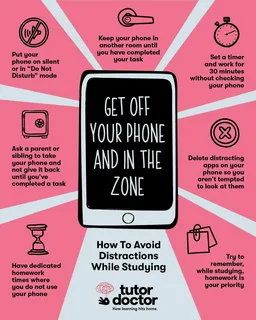
You don’t necessarily have to put your phone in another room.
Start by turning off unnecessary notifications.
Keep important calls or messages enabled if you need them, but consider disabling notifications from social media, shopping apps, games, and anything else that doesn’t need your immediate attention.
Your phone becomes much less distracting when it isn’t constantly asking you to look at it.
2. Use Do Not Disturb While Studying
Most modern smartphones have some form of Do Not Disturb or Focus Mode.
I think this is one of the easiest features students can use.
Before starting a study session, activate it for a specific period.
For example, if you’re planning to study for one hour, set your phone to stay quiet for that hour.
You can usually allow calls from specific contacts if you’re worried about missing something important.
The idea isn’t to completely disconnect from the world.
It’s to create a period where your attention belongs to one thing.
3. Keep Your Study Apps Easy to Find
Your home screen can influence what you do when you unlock your phone.
If the first thing you see is a collection of social media apps, you’re more likely to open one without thinking.
Consider putting your study-related apps on the first screen instead.
You might have:
- Your notes app
- Calculator
- Calendar
- PDF reader
- Dictionary
- Cloud storage
- Educational apps
- Your school portal
You don’t have to delete every entertainment app.
Just make the useful stuff easier to access.
4. Take Photos of Important Notes
Your phone camera isn’t only for taking selfies.
It can be surprisingly useful for studying.
If your teacher writes important information on a board, for example, you can take a photo of it if your school allows it.
You can also photograph pages, diagrams, or handwritten notes that you need to review later.
Some phones can recognize text in images, which makes it easier to copy important information into your notes.
Just remember that taking a photo isn’t the same as learning something.
Actually review the material later.
5. Scan Documents Instead of Carrying Everything
If you have paper notes or documents that you need regularly, your phone can help you create digital copies.
Document-scanning features can turn pages into PDFs that are easier to store and organize.
This is particularly useful if you’re dealing with lots of handouts.
Instead of searching through a backpack full of papers, you can have important documents stored in one place.
Just make sure you back them up.
6. Use Your Phone to Record Yourself Explaining a Topic
Here’s a simple study trick that doesn’t require a fancy app.
Study a topic, put your notes away, and use your phone to record yourself explaining what you’ve learned.
Pretend you’re teaching someone else.
If you can explain the concept clearly without looking at your notes, that’s a good sign that you understand it.
If you suddenly realize you can’t explain something, you’ve found an area that needs more revision.
You can even listen to your explanation later and identify parts that you weren’t completely sure about.
7. Use AI Carefully
AI tools can be useful for studying, but don’t turn them into an answer machine.
For example, if you’re struggling to understand a difficult topic, you can ask an AI tool to explain it in simpler language.
You can also ask it to create practice questions.
Instead of:
“Do my homework for me.”
Try:
“Explain this concept and then give me five questions to test whether I understand it.”
That’s a much better use of AI.
You’re using your phone to learn rather than simply copying answers.
8. Download Materials for Offline Study
Internet access isn’t always reliable.
If you know you’ll need certain notes, PDFs, videos, or course materials, download them while you have a good connection.